
What is cloud computing?
Cloud computing is a model for delivering computing services, including infrastructure, software, storage, databases, development platforms and more, over the internet. The remote data centers where these services run are referred to as “the cloud,” while the companies that maintain them are called cloud service providers, or CSPs. Instead of owning their own IT infrastructure or systems, companies access the resources they need from these providers, typically paying only for what they use. Providers may keep costs lower by leveraging economies of scale.
The cloud model offers benefits including scalability, lower capital costs, and reduced operational overhead. When an organization chooses to use cloud computing, its employees, customers, partners, and suppliers access the IT tools they need over the internet. From their perspective, cloud computing looks like any other current tech they can access from a desktop, laptop, phone, or other device. CSPs offer a huge array of options, including HR, sales management, engineering, logistics, and finance apps, along with infrastructure services to support your own apps. To infrastructure users, the cloud simply resembles a remote data center that can be managed using familiar system administration tools, such as dashboards and consoles. A critical difference, however, is that the CSP owns and maintains that remote data center, as well as all the hardware inside it, and is responsible for providing power, cooling, connectivity, and physical security. You, as a customer, choose the specific features and functions you need.
For customers, cloud computing offers agility, scale, and flexibility. Instead of spending money and resources on legacy IT systems, your staff can focus on more strategic tasks. Without making a large up-front investment, they can quickly access the computing resources they need—and pay only for what they use.
1. Key Concept
- The cost of cloud computing may be significantly lower than the cost of owning and managing a traditional on-premises data centre that delivers comparable scalability and redundancy.
- Many of an organization’s needs can be met with software-as-a-service (SaaS) cloud applications.
- Businesses can design, write, test, and deploy custom applications in the cloud.
- Cloud applications often support essential technologies, such as GenAI, blockchain, chatbots, and the Internet of Things (IoT).
- Reduced barriers to entry enable the rapid deployment of cutting-edge technological capabilities.
2. Types of Cloud Services
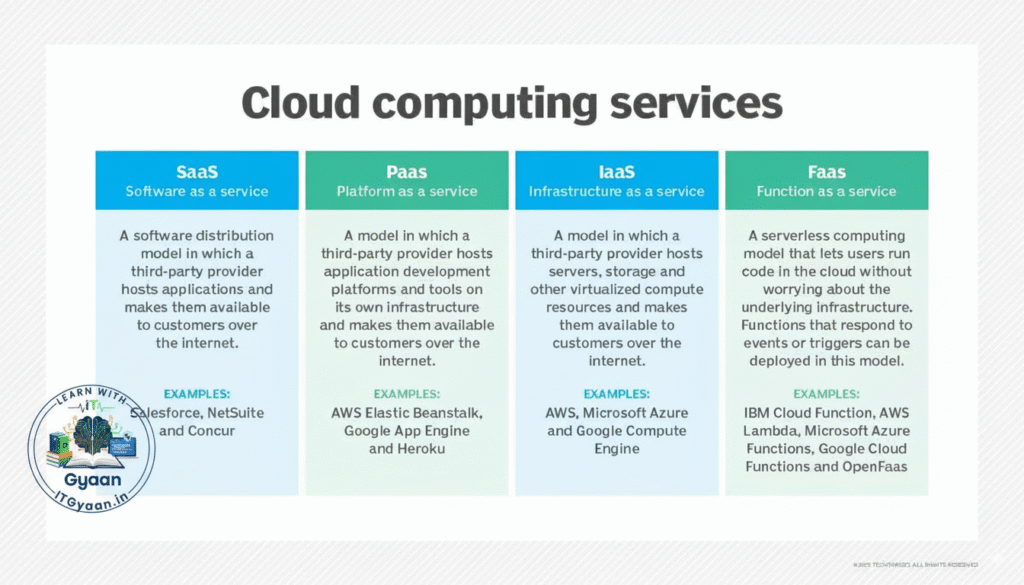
- IaaS (Infrastructure as a Service): Virtual servers, storage, and networks. Example: Amazon AWS EC2, Microsoft Azure VMs.
- PaaS (Platform as a Service): Tools and platforms for developers to build applications without managing underlying servers. Example: Google App Engine, Azure App Service.
- SaaS (Software as a Service): Ready-to-use software delivered over the internet. Example: Gmail, Microsoft 365, Zoom.
3. Deployment Models
- Public Cloud: Services offered over the public internet (e.g., AWS, Azure, Google Cloud).
- Private Cloud: Cloud infrastructure used exclusively by one organization.
- Hybrid Cloud: A mix of public and private clouds for flexibility.
4. Benefits
There are several upsides pushing organizations across all industries toward the cloud. For many, traditional on-premises data centers or small server rooms no longer deliver the agility and flexibility the business requires. The explosion of data created by an increasing number of digital systems is pushing the cost and complexity of data centers and the systems they hold to new levels and demanding new skills and analytics tools from IT.
Cloud solutions can help companies meet the challenges of the digital age. With cloud computing, instead of managing IT infrastructure, organizations can focus on the applications and services that support business success and let employees be more responsive to customers’ changing needs. With modern cost optimization, the cloud delivers measurable business value, helping businesses of every size achieve their full potential.
Here are a few areas in which cloud computing provides a compelling advantage over traditional IT:
- Cost: Costs are not only lower but shifted from capital expenses to operational expenses.
- Speed: Provision resources for development, testing, and deployment in hours, not months.
- Global scale: Grow elastically using the vendor’s cloud data centers, typically located around the world.
- Productivity: Spend less time installing, configuring, and managing systems and more time on fine-tuning services to meet your business needs.
- Performance: Gain better price-performance for many business-critical workloads.
- Optimization: Cloud native workloads, designed especially for cloud architectures, can be more efficient than traditional software.
- Reliability: Cloud applications are designed to be fault-tolerant and scalable, and cloud vendors offer highly reliable systems and services.
What’s more, many organizations are already realizing these benefits:
- Cloud-based applications can be accessed from anywhere, whether a corporate HQ, a home office, or a customer site.
- There are cloud-based SaaS applications available that work with desktops, notebooks, mobile phones, and embedded devices.
- Companies can save money by getting rid of most, or all, of their data center hardware.
- While security is always a shared responsibility, major cloud service providers have cybersecurity teams monitoring their facilities and systems 24/7, offloading some of that work.
- Business continuity and disaster recovery efforts can leverage the scale of cloud computing, using the cloud itself to provide backup services and sites with near-instantaneous failover.
- Because cloud data centers are large, modern, and efficient, they can be greener, with a lower carbon footprint and energy consumption than traditional on-premises data centers.
5. Example Analogy
Think of cloud computing like electricity:
- You don’t generate electricity at home; you use power from the grid.
- Similarly, you don’t have to own huge servers; you “use” computing power from the cloud.